Your leads contacted.
You stay focused on selling.
JOEY handles texts, emails, and calls so you can spend your day on appointments, demos, and closings. Every message is written in your voice. Every lead gets touched. Nothing falls through the cracks.
Getting set up: 6 steps, in this order
This is the whole sequence, start to finish. Approval can take minutes, and the part that takes you the longest is choosing your mode and entering your own logins.
- 1
Sign up, which means choosing your membership
Signing up is choosing the membership you want. You pick the plan, you create the account, and that is one step, not two. Every plan includes the full JOEY system.
- 2
Onboarding, then approval
Onboarding is where you tell JOEY your name, your tone (direct, friendly, professional), your signoff, and the schedule you want JOEY to work. Then your account goes through approval. Approval can take minutes.
- 3
Choose your mode of operation
Your mode is how JOEY actually does its work. The VPS is the mode of operation available today. The Chrome extension is coming soon. See the section below for what the VPS is.
- 4
You enter your own credentials and secrets
You put in your own logins yourself, directly into the VPS through the remote viewing tool. You type them, not us.
- 5
JOEY kicks off on your schedule
JOEY starts on the schedule you entered during onboarding. You do not have to launch it each morning. It begins at the time you set and works from there.
- 6
You control everything from the JOEY dashboard
The dashboard is the control room: the JOEY aggressiveness, the auto dialer, and the rest of the settings. Change them while JOEY is running and the change takes effect from there.
Your mode of operation
Your mode is how JOEY does its work. The VPS is the mode of operation available today, and the default. The Chrome extension is coming soon. In the VPS, you enter your own credentials and secrets yourself.
The VPS
JOEY runs on hosted hardware set aside for your account instead of on your own machine, so it is not tied to your computer being awake and logged in. This is the mode of operation available today.
You enter your credentials into the VPS yourself, directly, through the remote viewing tool.
The Chrome extension (coming soon)
JOEY will run inside Chrome on your own computer, in the same browser profile where you are signed into your CRM. Not selectable yet.
You will enter your credentials into your own browser once it is available.
Your credentials and secrets are entered by you, directly into the VPS through the remote viewing tool. Nobody on our side types them in for you.
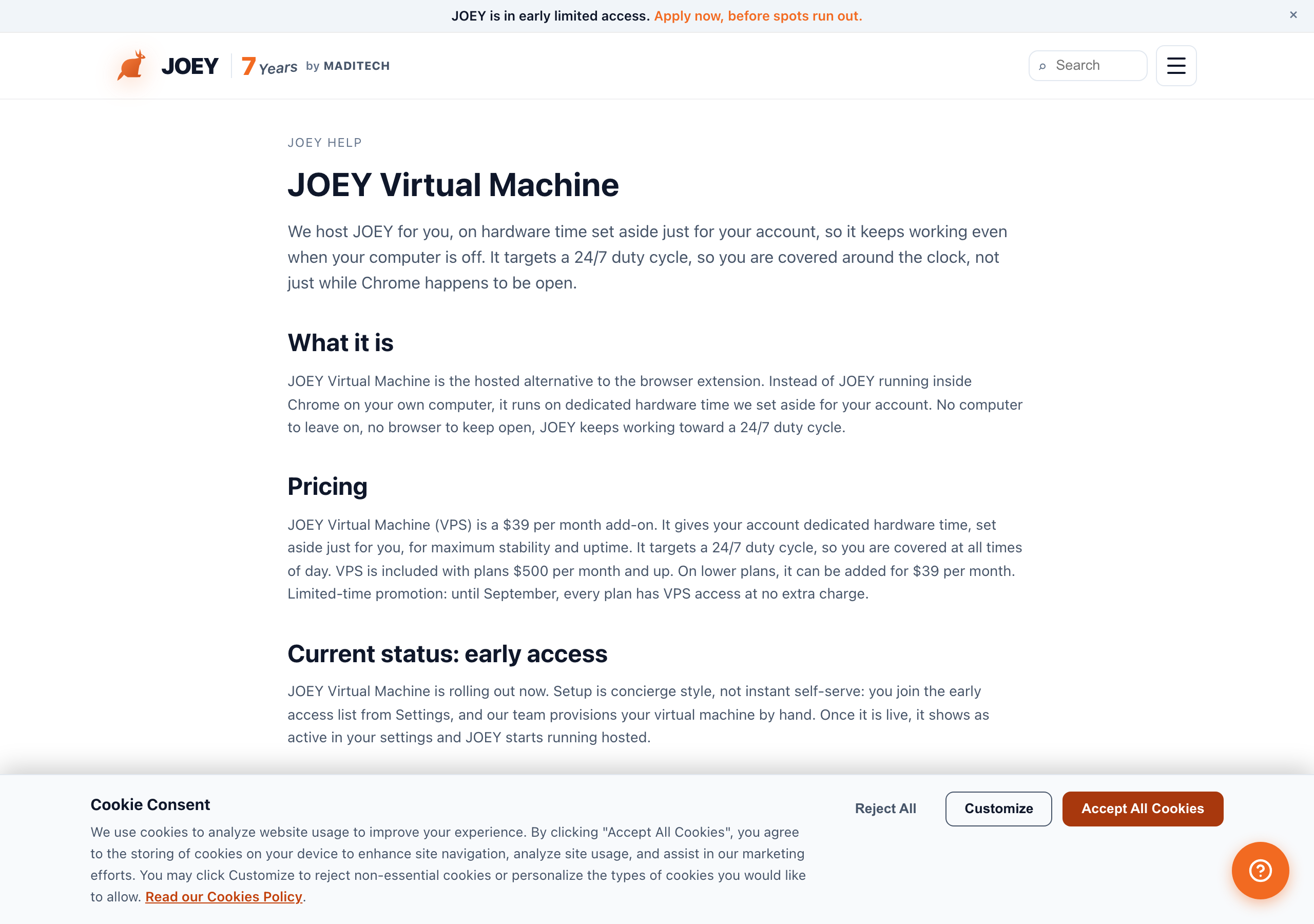
Your daily flow with JOEY
You just come in to work. JOEY organizes around your schedule and stops working when you start, and it turns itself off at the end time you set.
- You just come in to workJOEY organizes itself around your schedule and stops working when you start. You do not clock it in or hand it a list.
- Set the schedule about 15 minutes after you arriveThis is our own recommendation, not a rule. Setting JOEY to start roughly 15 minutes after you get in gives you time to get set up, and it absorbs the days you run a little late.
- Check the work JOEY didLook at your CRM workplan page or history page, or use the tools in the JOEY dashboard, which also show the outgoing activity.
- Control the settings liveThe aggression dial and the other dashboard controls change how hard JOEY is working, while it is working.
- Turn the auto dialer on and off as you need itTurn it on when you want calls coming to you. Turn it off when a customer is at your desk, or any other time you need quiet.
- JOEY turns itself off at the end of the dayAt the end time you set, JOEY shuts its own work down. There is nothing to remember at close.
- Manually dial 40 leads, most go to voicemail
- Type 20 individual texts between customers
- Forget to follow up on 30+ leads
- Spend 60% of your day on outreach, 40% selling
- New leads wait hours for a first response
- 120+ calls logged automatically, voicemails left
- 150+ to 350+ personalized texts and emails sent (Pro and above)
- Every lead touched on schedule, nothing missed
- You spend 90% of your day on appointments and closings
- New leads get a first contact within minutes
Texts and emails sent for you
JOEY handles every outbound text and email to your leads. Responses come back to you in your CRM as normal. You focus only on the replies that come IN.
120-second reply window (configurable)
When a lead replies, JOEY gives you 120 seconds to jump in and answer personally. If you do not respond in that window, JOEY sends a contextual reply for you. The window length is configurable in your dashboard settings.
Live Fleet View
A real-time panel in your dashboard shows every lead, their current phase, the last action taken, and what is queued next. Nothing runs blind.
Pause in one click
Press Stop at any time from the dashboard to pause all outbound activity instantly. Press Start again to resume right where JOEY left off.
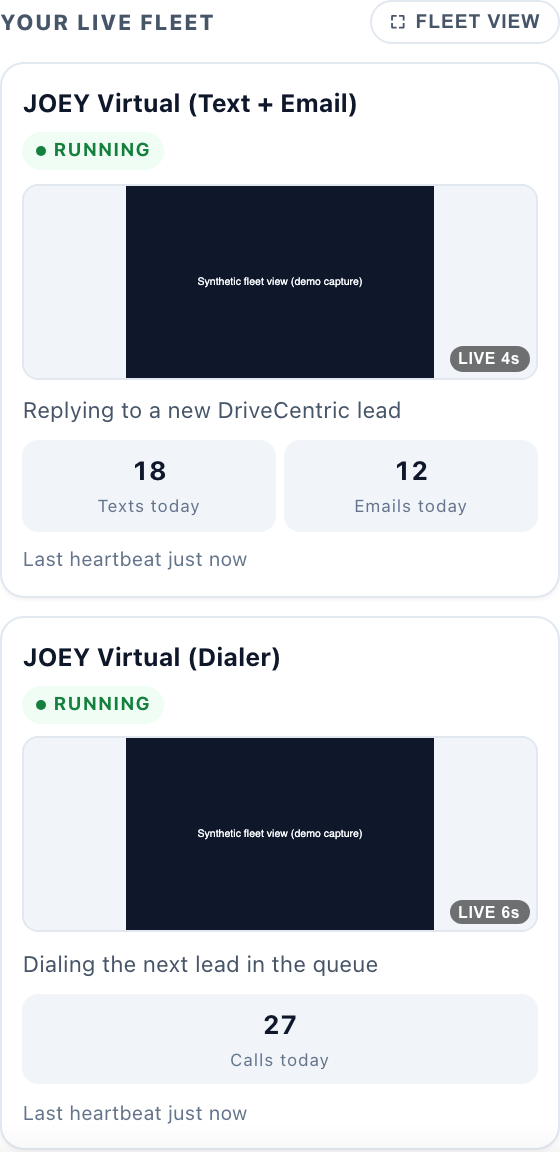
Try the dashboard right here
This is the real JOEY dashboard, the same code a customer signs in to, running on sample data. Drag the aggression dial, start and stop the auto dialer, and hover any control to see what it does and which plans include it. Nothing on this page touches a real customer record.
The live dashboard
The real controls, running on sample data. Nothing here touches a real customer.
Every name, phone number and message in the demo is invented. Phone numbers use the 555 range reserved for fiction and emails use example.com, so nothing here can reach a real person.
The First Contact Ritual
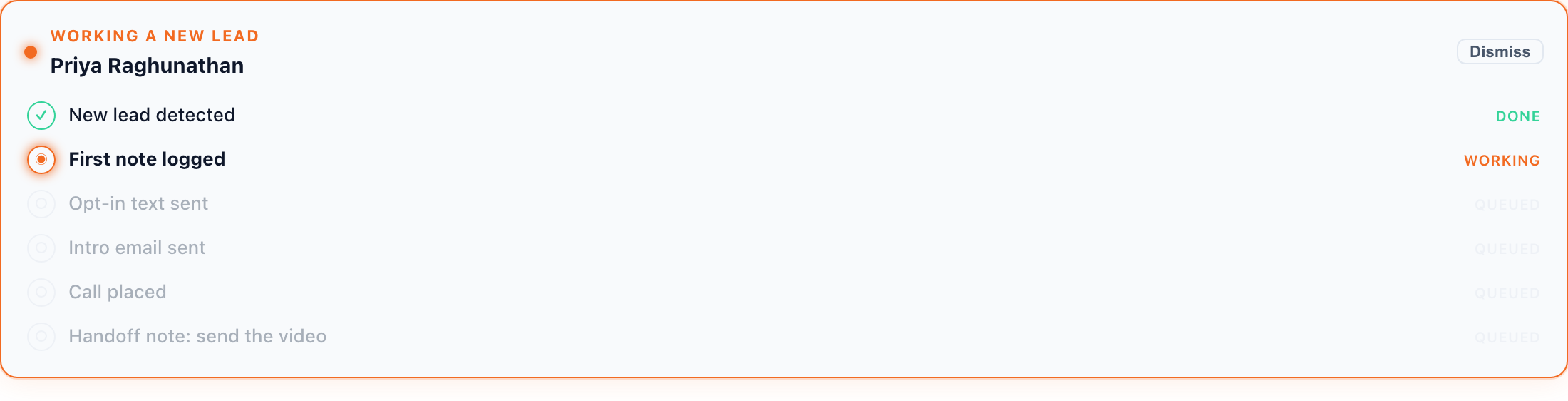
Every new lead triggers a 6-step ritual that runs in a fixed order, within minutes of the lead landing. The call comes second, so you reach the customer before anything slower runs. This is the sequence that books appointments.
Whether the lead comes from a KBB instant cash offer, a buying inquiry, or a trade-in, JOEY starts the same six steps before you see the notification. Quiet hours, text consent and your suppression list apply to every step, a live popup shows each step as it happens, and an Abort button stops the run at any point. The Chrome extension and the JOEY Virtual Machine both run this automatically. You pick draft-only, where JOEY drafts and you send, or auto-send with review, and either way you watch the screen during your scheduled hours, as the terms require. Your only remaining job is step 6.
- 1
The first note: the 2 Minute DrillAuto
JOEY opens the lead in your CRM and writes a note with the lead type and what it knows at the moment of detection: the source, the customer's name, the vehicle from the list row. It runs before any dialing, so it never waits on a scan. The paper trail starts in the first minute.
- 2
The call, routed to your phoneAuto
JOEY places the call next and routes it to your desk phone or mobile, so you are the first person the customer speaks to. In Simple mode, the default, JOEY places one call. In Advanced mode JOEY places up to three calls in a row, each one starting only after the last has ended, and an answered call stops the burst. If nobody picks up, JOEY logs the outcome in your CRM.
- 3
Compliance opt-in textAuto
JOEY sends the required TCPA opt-in text: "May I text you? Reply YES to confirm." No further texts go out until the customer replies YES. Every send is compliant.
- 4
Profile scanAuto
JOEY reads the customer's profile. For a KBB instant cash offer lead it opens the offer link and pulls the vehicle, the offer amount and the customer's details into the knowledgebase. For a sales lead it logs the inquiry details. The scan sits here, right before the email, because it is the slow step and it used to hold up the call.
- 5
Personalized first emailAuto
The email is built from what the scan just found: the customer's name, their specific vehicle, the real offer amount. It names the exact car they asked about instead of opening with a generic thank-you.
- 6
Final note: "send video now"Your only task
JOEY leaves a note on the lead that says "send vid now @YourName" so you see it in your CRM. A quick personalized video from you is the single highest-converting touch you can make. JOEY sets everything up; your job is to record and send that video. That is the one thing only you can do.
The Reactivator
Most leads do not buy on day one. The Reactivator is JOEY's lead re-engagement engine. It mines your existing pipeline and keeps every lead warm until they are ready to move.
How it works
The Reactivator runs on a configurable schedule throughout the day. By default it contacts each lead 3 times per day across a mix of texts, emails, and calls. You can dial it up or down per lead type.
- ICO (instant cash offer) leads: default 2 touches per day
- Buying and selling leads: default 3 touches per day
- Cold or aged leads: configurable, as low as 1 touch per day
- Active hot leads: configurable, up to 5 touches per day
Configuring the Reactivator
You have two ways to adjust it from your dashboard:
- Per lead type sliders for touch frequency (granular control)
- A plain text input where you can type natural language like "contact ICO leads twice a day, buying leads three times, no weekends" and JOEY updates the settings
- Quiet hours are always respected regardless of frequency settings
- Opt-out leads are permanently removed from all outreach the moment they reply STOP
Most CRMs have a follow-up task list that runs days or weeks out. Salespeople forget tasks or let them pile up. The Reactivator runs every cycle automatically. A lead you spoke to 3 months ago who went quiet gets touched today, tomorrow, and the day after, at the right frequency for their lead type, in your voice, without you remembering to do it.
The CRM Auto Dialer
Turn the auto dialer on from your dashboard when you want calls. JOEY works through your lead list and routes each call directly to you, one by one, hands-free. Turn it off when a customer is at your desk, or any other time you need it quiet.
- Dials leads one by oneJOEY works through your assigned lead list in priority order and routes each call to your desk phone or mobile. You pick up and you are live with the lead immediately. No manual dialing, no copy-pasting numbers.
- Detects if you are still on a callJOEY monitors whether your line is busy. If you are mid-conversation, JOEY waits and only starts the timer for the next dial after your current call ends. No overlap, no interruptions, no missed context.
- Configurable interval between callsSet the cadence in your dashboard. Default is one new lead call per minute, giving you time to take notes and breathe between dials. You can tighten it to 30 seconds or stretch it to 3 minutes depending on your style.
- Desk phone or mobileConfigure your preferred routing from the dashboard. Send calls to your dealership desk extension or your personal cell. Switch anytime, takes effect immediately.
- Default outcome: leave voicemail and log the callIf a lead does not pick up, JOEY leaves a voicemail and logs the call in your CRM automatically. The log includes the timestamp, the outcome, and what was said. No manual note required.
- "Start conversation" modeSwitch the dialer to Start Conversation mode. In this mode, when a lead picks up, JOEY automatically logs the call and leaves a note in the CRM so you can focus on talking without stopping to type. After the call ends, the summary is already there.
Conversational AI, not templates
This is the single most important technical difference between JOEY and every other follow-up tool on the market.
Carriers and spam filters have gotten aggressive. When 500 or 5,000 leads all receive the identical message from the same number, that message gets flagged as bulk commercial traffic and filtered before it reaches the phone. Legacy follow-up services run on templates. Every customer gets the same copy. Carriers know this pattern and block it. Your texts end up in spam folders or are silently dropped. You never know it happened.
Latest LLMs
JOEY uses the most capable language models available to write each message from scratch. No two messages are the same, even for the same lead type.
Your voice, every time
Every message is written in the tone and style you defined in onboarding. Customers think they are texting you personally because they are, through JOEY.
Better deliverability
Organic, varied messages pass carrier filters that block template blasts. More messages land in the inbox. More leads actually read your outreach.
Context-aware
JOEY remembers what was said in the last message and the full conversation history. Follow-ups reference the prior exchange naturally, not robotically.
Vehicle-specific
Messages reference the actual vehicle the lead inquired about. A Ram 1500 buyer gets Ram copy. A Jeep shopper gets Jeep copy. Personalized down to the trim level.
Compliance built in
TCPA opt-in is step 3 of every first contact. Quiet hours are always respected. Opt-outs are processed immediately and permanently. JOEY never sends to a lead who said stop.
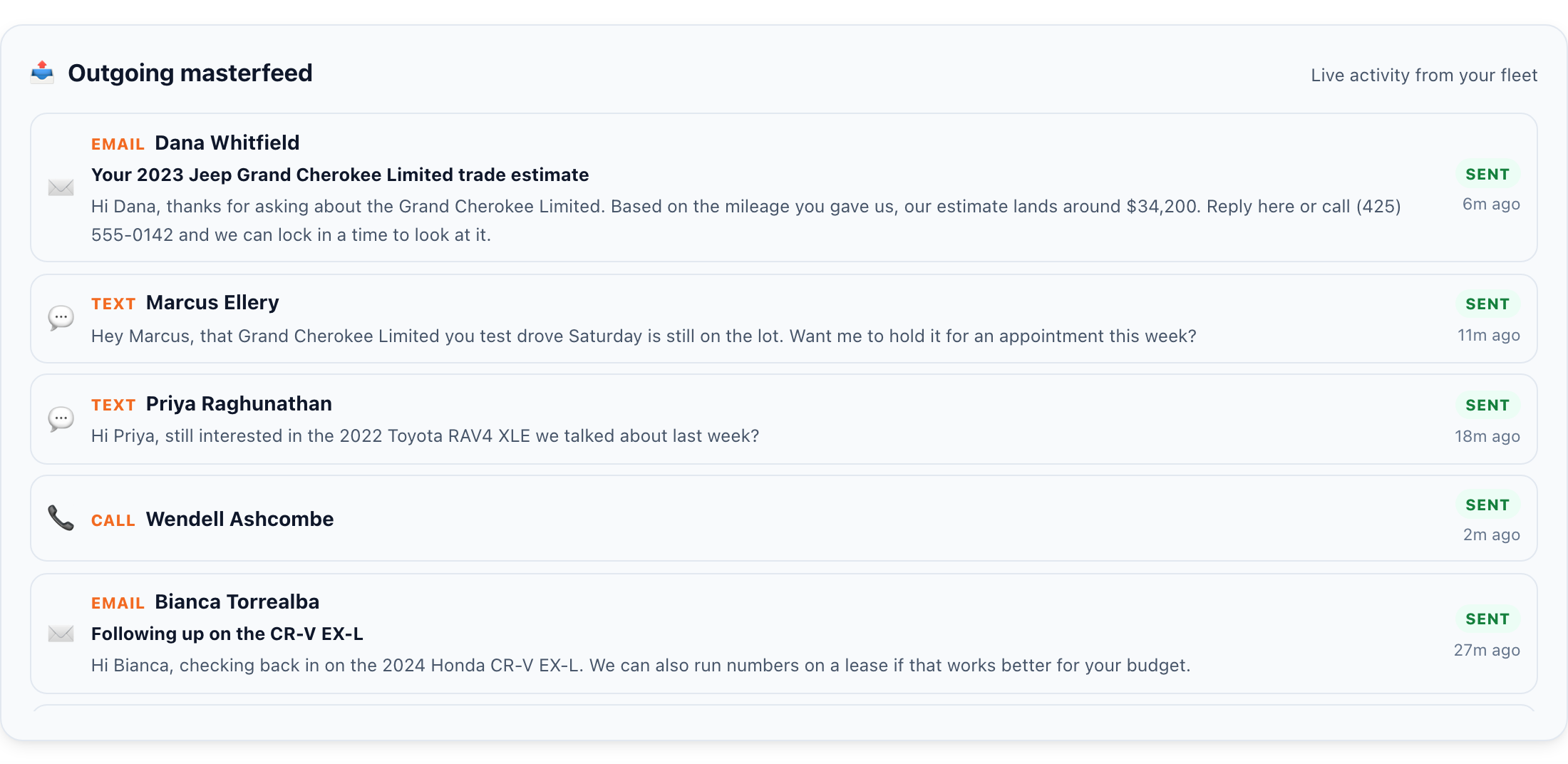
20+ Phases
JOEY runs on a phase engine. Each phase is a distinct type of outreach or action. Phases run in sequence and in parallel, intelligently, based on your lead list and what each lead needs next.
Phase Marketplace (coming soon)
Top-performing salespeople will be able to publish their own custom phases to the JOEY Phase Marketplace. If another rep uses your phase and converts, you earn. The marketplace turns your best follow-up sequences into passive income.
Ready to let JOEY handle the hustle?
Get started today, risk free. Full Pro plan, backed by a 30-day money-back guarantee. Sign up by picking your membership, answer the onboarding questions, and go through approval, which can take minutes.